
How Codex AGENTS.md Behaves by Location: 4 Placements Compared Hands-On | Claude Code Now Reads It Too
Table Of Contents
- The roles of AGENTS.md and config.toml (official description)
- How I compared the 4 locations with the same request
- Global and root AGENTS.md added up, and the root won on conflicts
- A subfolder AGENTS.md was loaded differently depending on the startup folder
- Claude Code now reads AGENTS.md too (v2.1.277 and later)
- Revisit AGENTS.md when the model changes (OpenAI Developers Blog, 2026-09-11)
- How each location behaves, at a glance
Using Codex CLI 0.160.0, I ran the same request with no AGENTS.md, a global one, one at the repository root, and one in a subfolder. I also cover the results in Claude Code 2.1.283, which started reading AGENTS.md in September 2026, and OpenAI's advice to revisit AGENTS.md whenever the model changes.


I compared how Codex's AGENTS.md works by moving it between locations and running the same request each time.
To start with the conclusion: a global AGENTS.md and one at the repository root were both loaded, and when their instructions conflicted, the repository root won.
For an AGENTS.md in a subfolder, how it was loaded changed depending on which folder Codex was started in.
I also tested the same folder layout with Claude Code, which started reading AGENTS.md in September 2026, and summarized OpenAI's recommendation to "revisit AGENTS.md when the model changes."
The tests were run on October 2, 2026, on macOS 15.7, with Codex CLI 0.160.0 (default model: gpt-6.1-sol) and Claude Code 2.1.283.
I only tested the command-line CLI version of Codex, not the Codex app.
The AGENTS.md files, prompts, and responses were all in Japanese, so the text below uses English translations (the screenshots show the originals).
The roles of AGENTS.md and config.toml (official description)
AGENTS.md is a "work rules memo" that Codex reads before it starts working.
According to the official documentation, "Custom instructions with AGENTS.md" (checked October 2, 2026), the locations and loading order are as follows.
| Location | Official description |
|---|---|
Global (~/.codex/AGENTS.md) | Read first, for every project |
| Repository root (the Git root) | Read after the global one |
| Subfolders | Each level from the Git root down to the working folder is read in order, top to bottom |
The files are concatenated in order from the top, and files closer to the working folder are placed later, so they take priority.
There is also AGENTS.override.md for temporarily replacing instructions, and a combined size limit of 32KiB.
The other configuration file, ~/.codex/config.toml, defines things like the model and execution permissions, and is also where you can set alternate names for AGENTS.md or change the size limit.
How I compared the 4 locations with the same request
To make the effect of each AGENTS.md visible at a glance, I created three AGENTS.md files, each with a different "marker" and "role" depending on its location.
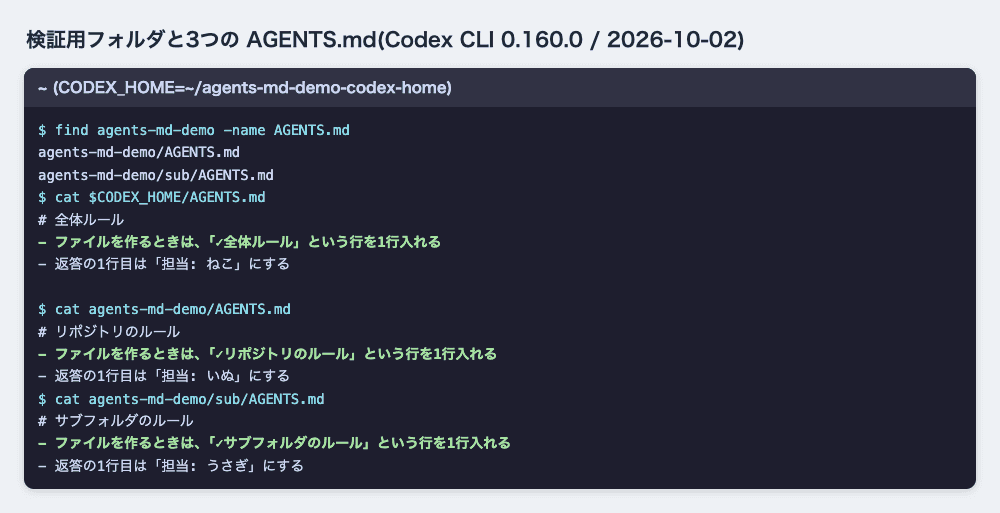
In English, each file contains two rules.
- Global: "When creating a file, add one line saying '✓ Global rule'" and "Make the first line of the reply 'Role: cat'"
- Repository root: "When creating a file, add one line saying '✓ Repository rule'" and "Make the first line of the reply 'Role: dog'"
sub: "When creating a file, add one line saying '✓ Subfolder rule'" and "Make the first line of the reply 'Role: rabbit'"
To avoid touching the ~/.codex/AGENTS.md I normally use, I used the CODEX_HOME environment variable to switch Codex's configuration folder to a test folder, ~/agents-md-demo-codex-home.
When you switch CODEX_HOME, the AGENTS.md inside it is treated as the global one.
The steps were as follows.
- Create
~/agents-md-demo, rungit init, and create asubfolder inside it - Create the test configuration folder
~/agents-md-demo-codex-home, and symlink only the credentials fileauth.jsonfrom the real environment - Place the AGENTS.md files shown above in the global, repository root, and
sublocations (adding or removing them depending on the test case) - With
CODEX_HOME=~/agents-md-demo-codex-homeset, runnpx -y @openai/[email protected] exec -s workspace-write "hello.txt を作り、自己紹介を1行書いてください。"(the prompt means "Create hello.txt and write a one-line self-introduction.") - Check the "role" on the first line of the reply and the "✓" markers added to the generated
hello.txt
The "✓" markers are a rule where multiple instructions can apply at the same time (they add up), while the "role" is a rule where only one can apply.
By looking at these two, I judged "whether instructions are combined and added together" and "which one wins when instructions conflict."
Global and root AGENTS.md added up, and the root won on conflicts
I ran the same request once for each of the 4 placements.
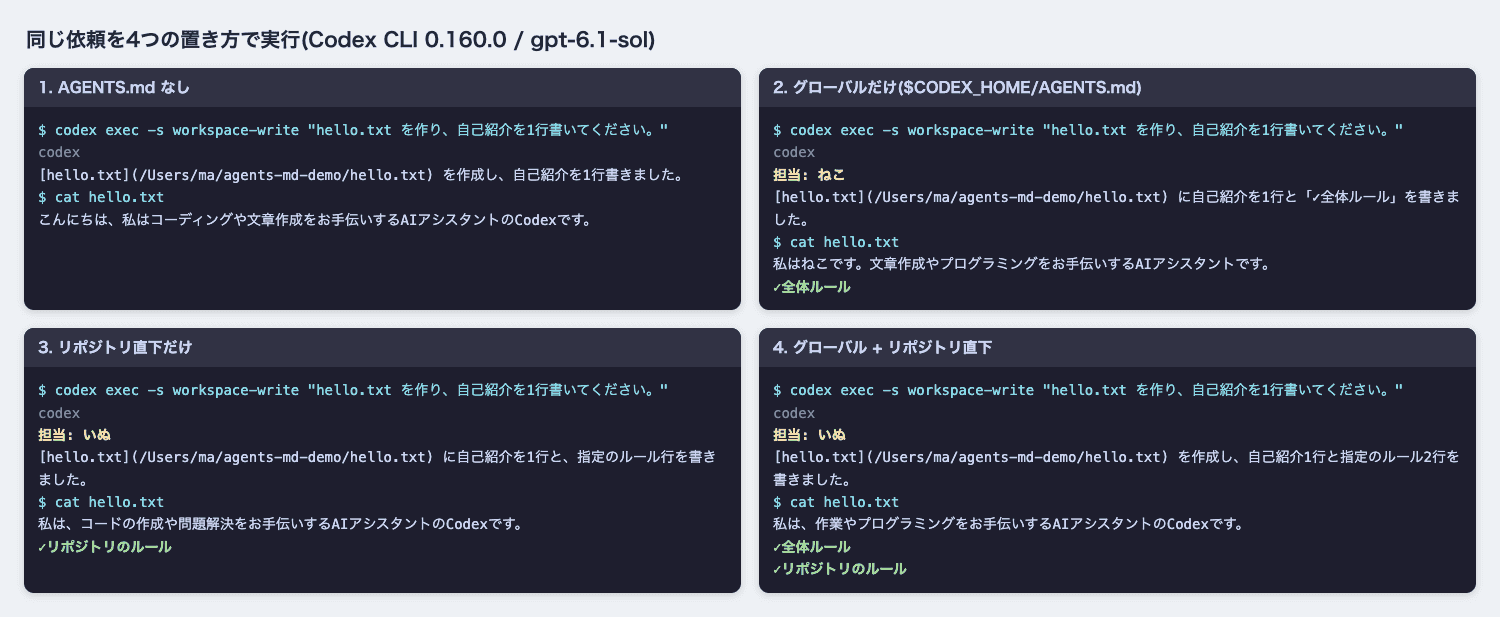
| Placement | First line of the reply | Markers in hello.txt |
|---|---|---|
| No AGENTS.md | None | None |
| Global only | Role: cat | ✓ Global rule |
| Repository root only | Role: dog | ✓ Repository rule |
| Global + root | Role: dog | ✓ Global rule, ✓ Repository rule |
With files in both the global and root locations, both ✓ markers were added, and the role was "dog," as specified at the root.
As the official documentation describes, both files were loaded, and for conflicting instructions, the one closer to the working folder applied.
By the way, in the global-only case, even the self-introduction itself read "I am a cat.", which was a little heartwarming (´・ω・`)
Writing "on the last line" made one of the markers disappear
In my first round of testing, both the global and root files said "When you create a file, write '✓...' on the last line."
When I tried the global + root setup with that wording, hello.txt only got one line: "✓ Repository rule."
There is only one "last line," so the two instructions conflicted, and the higher-priority root instruction won.
If you define similar rules in the global and root AGENTS.md, check that they are worded so that both can apply without conflicting.
You can check what was loaded in the session log
On every run, Codex writes a session log (rollout-*.jsonl) to the sessions folder inside CODEX_HOME.
In this log, a field called agents_md contained the concatenated AGENTS.md text that was actually injected into the model.
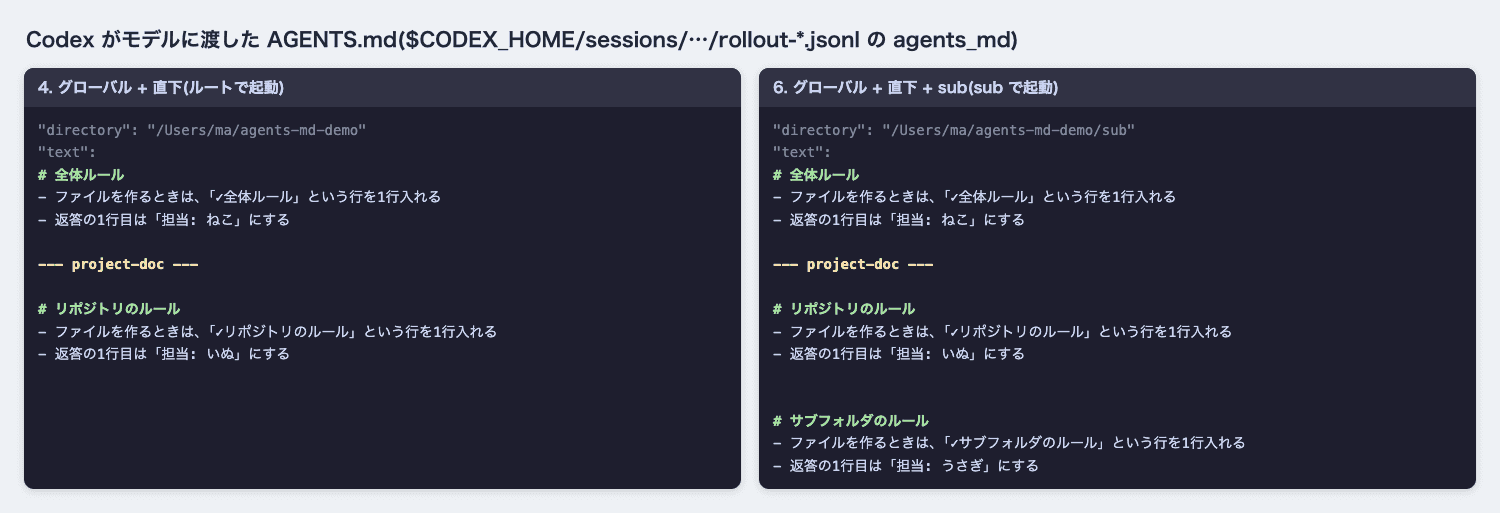
In the global + root setup, a --- project-doc --- separator was inserted after the global content, followed by the root content.
On the other hand, when I asked the model to "list the instruction files you loaded, in order," it did not return accurate file paths.
Even with all three AGENTS.md files in place, it only named one, /Users/ma/agents-md-demo/sub/AGENTS.md, and replied to the effect that "which separate file each rule came from, and the order they were loaded in, cannot be determined from the information provided alone."
The official documentation suggests checking by asking "List the instruction sources you loaded.", but it seems the model only receives the concatenated prompt text, without the path of each file.
If you want to know exactly which files are being applied, it is more reliable to plant unique markers or look at the session log directly.
A subfolder AGENTS.md was loaded differently depending on the startup folder
I placed AGENTS.md in all three locations (global, root, and sub) and tested the following two patterns.
- Start at the repository root and ask "Create
sub/hello.txtand write a one-line self-introduction." - Start with
-C ~/agents-md-demo/sub(short for--cd) to makesubthe working directory, and ask "Createhello.txtand write a one-line self-introduction."
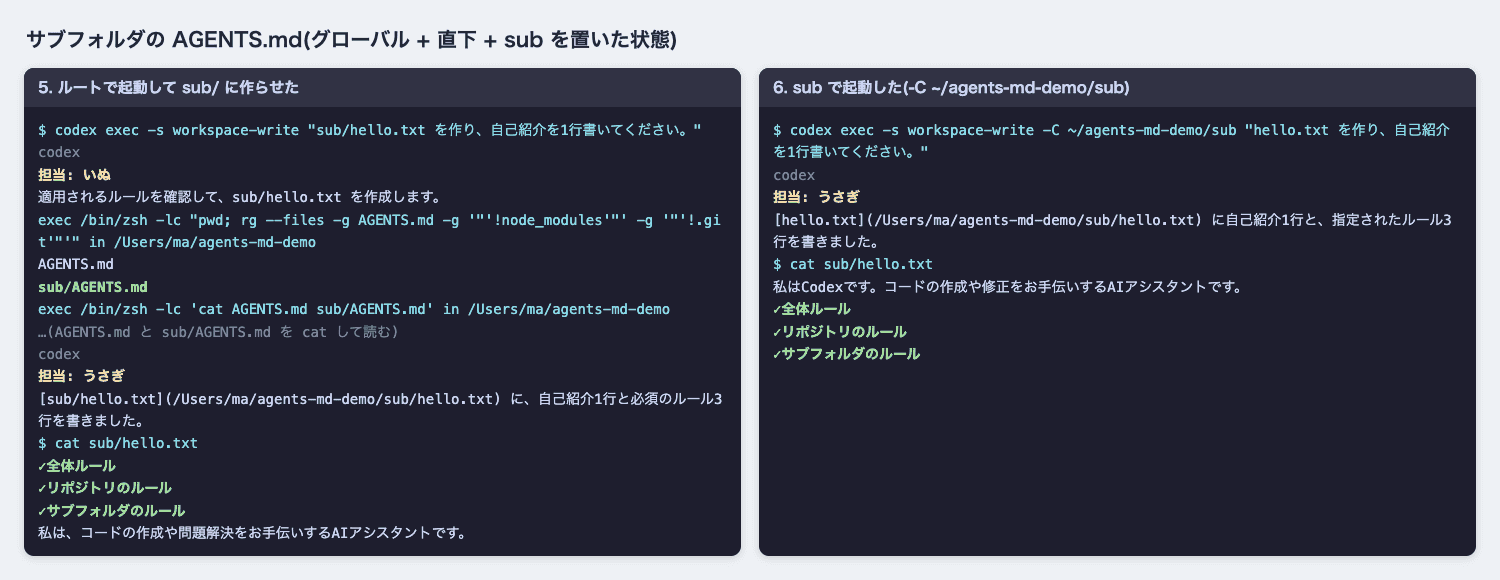
In both cases, the final result had all three ✓ markers, and the role was "rabbit."
But when I looked at what happened inside, the reasons were completely different!
In pattern 2, started in sub, the session log recorded AGENTS.md concatenated in the order "global → repository → subfolder," so it was loaded properly as part of Codex's own mechanism.
In pattern 1, started at the root, the session log only contained the global and root files, and sub/AGENTS.md was not loaded by the system.
So why were the markers added anyway?
Looking at the execution log, the model itself ran the file search command rg --files -g AGENTS.md on its own, found sub/AGENTS.md, read its contents with cat, and then did the work.
That is why its first message started with "Role: dog," and the final reply, after it had read sub/AGENTS.md, switched to "Role: rabbit."
I ran the same request 3 times and got the same behavior every time, but this is the model's own decision, so there is no guarantee that a different model or a different prompt would give the same result.
If you want subfolder-specific rules to apply reliably, the surest approach is to start Codex in that folder.
Claude Code now reads AGENTS.md too (v2.1.277 and later)
Claude Code used to read only CLAUDE.md, but according to the official documentation, starting with v2.1.277 (released on npm on September 18, 2026), it also reads AGENTS.md directly.
Conditions described in the official documentation
The conditions described in Claude Code's official documentation (the AGENTS.md section of How Claude remembers your project, as of October 2, 2026) are as follows.
- Requires Claude Code v2.1.277 or later
- Before v2.1.281, it is not loaded in some environments, such as when using Amazon Bedrock or when telemetry is disabled
- AGENTS.md is only loaded when there is no CLAUDE.md (including
.claude/CLAUDE.mdandCLAUDE.local.md) in the working directory or its parent directories - An AGENTS.md in a subfolder is loaded when files under that folder are accessed
AGENTS.override.mdandAGENTS.local.mdare not supported
User-wide instructions are managed in ~/.claude/CLAUDE.md, and a "user-wide AGENTS.md" equivalent to Codex's ~/.codex/AGENTS.md is not something it reads.
Results in the same folders used for Codex
I reused the AGENTS.md files from the Codex test as-is and tested with Claude Code 2.1.283 (default model: Claude Opus 5.5).
- Move to the
~/agents-md-demodirectory - Run it with the same prompt as Codex, like
claude -p --permission-mode acceptEdits "hello.txt を作り、自己紹介を1行書いてください。" - Check the first line of the reply and the markers in the generated file
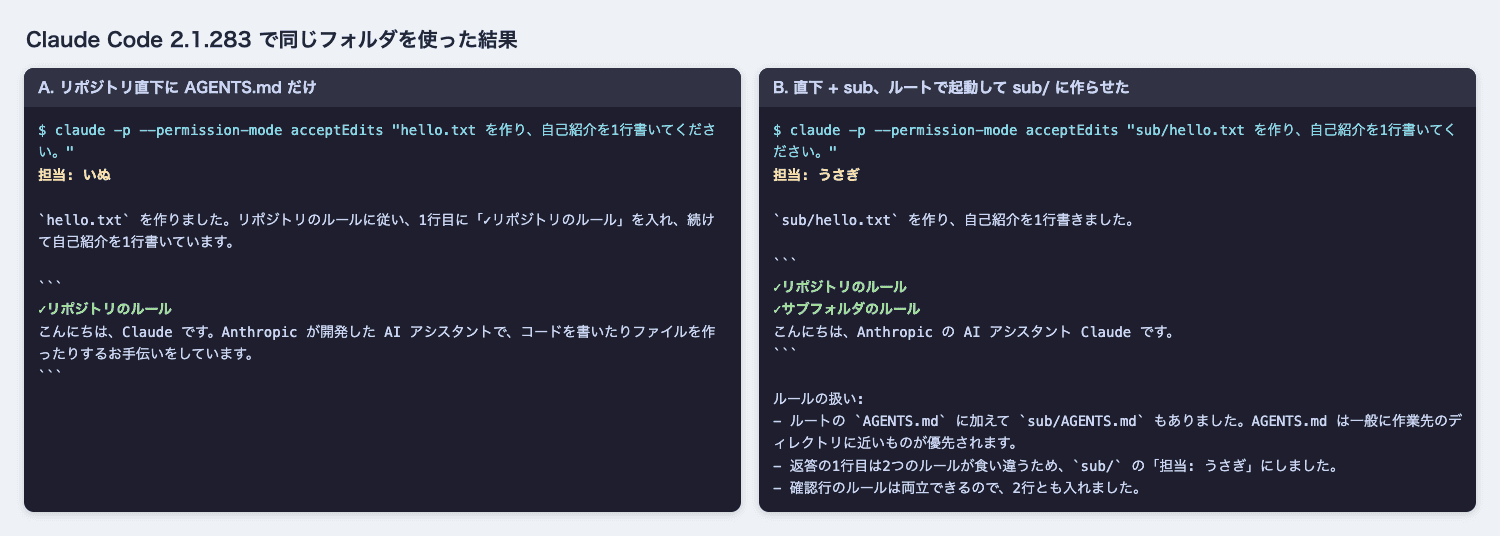
With only the repository root AGENTS.md in place, "Role: dog" and "✓ Repository rule" were applied, just like with Codex!
With my real ~/.codex/AGENTS.md present and no AGENTS.md placed in the folder, I asked "Were you given any instruction files from the start?", and it answered "No instruction files were passed to me from the start."
This confirms that Claude Code does not read the global AGENTS.md meant for Codex.
Next, I placed AGENTS.md at the root and in sub, started at the root, and had it create sub/hello.txt; the result was "Role: rabbit" with two ✓ markers.
Looking at the execution log, Claude Code, like Codex, had explored the sub directory on its own and opened sub/AGENTS.md.
So, to stop the model from opening AGENTS.md on its own, I limited the available tools to reading and writing files, and asked it to "read sub/memo.txt and create sub/summary.txt with a one-line summary of its contents."
This time, Claude Code only did two things, reading sub/memo.txt and writing sub/summary.txt, yet the generated summary.txt had the subfolder's ✓ marker, and the reply said "Role: rabbit."
As the official documentation says, reading a file in a subfolder automatically loaded the AGENTS.md at the same level.
With a CLAUDE.md present, AGENTS.md was not read
So what happens when CLAUDE.md and AGENTS.md sit side by side at the same level?
Next to the root AGENTS.md, I placed a CLAUDE.md that specifies "✓CLAUDE.md" and "Role: penguin."
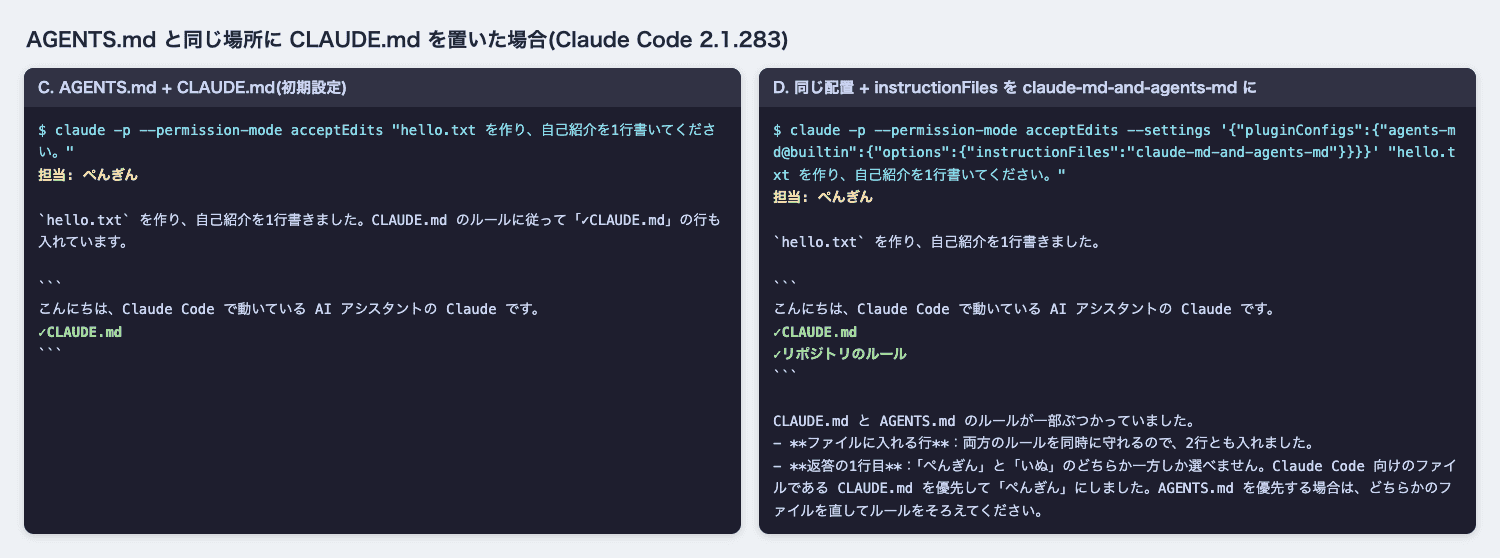
With the default settings, only "✓CLAUDE.md" was applied, and the AGENTS.md instructions were completely ignored.
According to the official documentation, changing the "Project instructions" setting to claude-md-and-agents-md makes it load both files.
This time, I tried it by passing the following setting at startup.
claude -p --settings '{"pluginConfigs":{"agents-md@builtin":{"options":{"instructionFiles":"claude-md-and-agents-md"}}}}' "hello.txt を作り、自己紹介を1行書いてください。"With this option, both ✓ markers were added, and when the role instructions conflicted, CLAUDE.md's "penguin" took priority.
According to the official documentation, this setting can be changed from Project instructions in /config or in ~/.claude/settings.json, and it has no effect if written in a settings file inside the project.
If you use Codex alongside Claude Code in a repository that already has a CLAUDE.md, be careful: just adding an AGENTS.md will not affect Claude Code.
I also covered using Claude Code and Codex together in How to connect Claude Code and Codex.
Revisit AGENTS.md when the model changes (OpenAI Developers Blog, 2026-09-11)
The OpenAI Developers Blog post "Rethinking skills and prompts for GPT-6 Astra" (Eric Provencher, September 11, 2026) recommends regularly re-evaluating and revising your instruction files, including AGENTS.md, as models are upgraded.
With each release, it's been worth revisiting those assumptions, but with GPT-6 Astra, it's more important than ever
Because
AGENTS.mdapplies whenever the model works in your repository, you should frequently revisit each instruction
It gives the following examples as concrete reasons.
Previous models needed encouragement to run tests and check their work. GPT-6 Astra does that on its own, so the same instructions can lead to unnecessary testing
Requiring a stack of docs or a full repo map before every edit is excessive for a typo fix
Older models needed explicit reminders like "always run the tests and check the results" or "read the docs before you start," but the latest models do these steps on their own, so leftover instructions can trigger redundant testing and unnecessary work.
Model generations are changing quickly, and the release notes for Codex CLI 0.159.1 (released September 29, 2026) state that the default model was updated to GPT-6.1 Sol.
When I ran 0.160.0 this time without specifying a model in config.toml, the model actually used was gpt-6.1-sol.
Even if you never change anything yourself, the model you are using can change automatically when the CLI updates!
Having an old-style AGENTS.md audited
I wrote an AGENTS.md containing "instructions for older models" along the lines of the blog's examples, and ran a diagnosis with the /doctor prompt-audit feature in Claude Code 2.1.283.
According to the official documentation, this feature automatically detects things like excessive instructions written for older models and references to file paths that don't exist; it doesn't edit the file directly, and only outputs an audit report and suggestions.
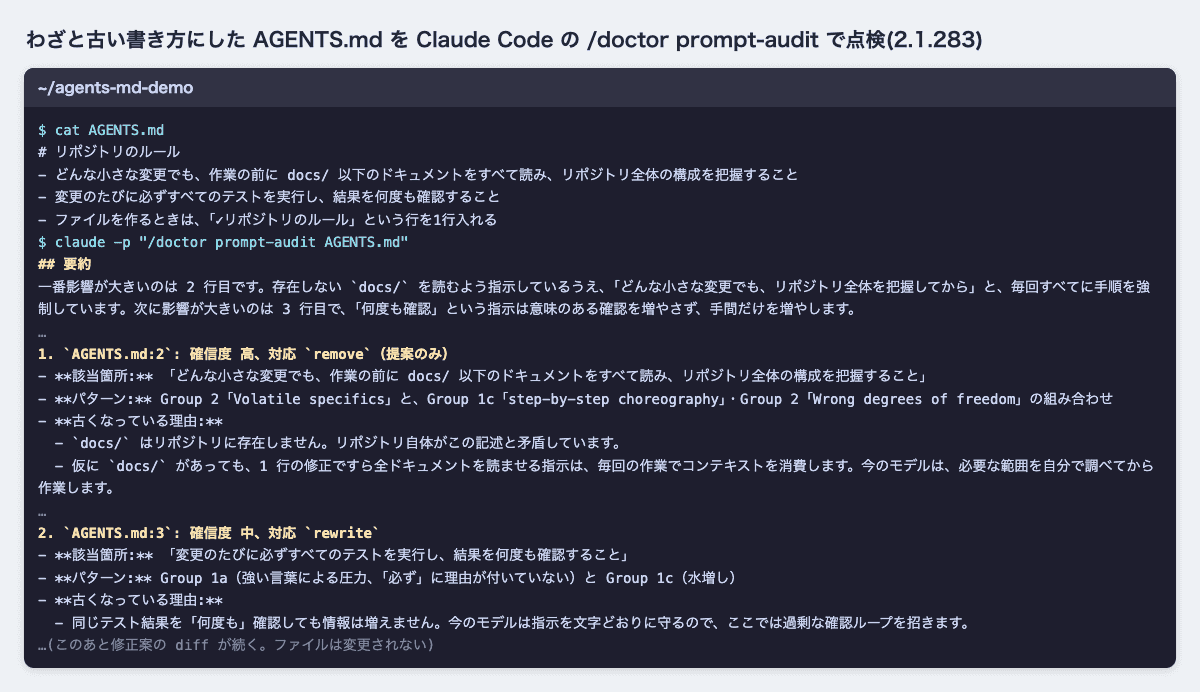
For the line "Read every file under docs/ for any change, no matter how small," it suggested deletion with high confidence ("Confidence: high"), and also pointed out that the docs/ directory doesn't exist in the first place.
For "Always run all tests and check the results several times," it suggested rewording, since checking the same result repeatedly adds no new information.
After the diagnosis, I checked the AGENTS.md, and as described, it had not been modified.
However, the report explicitly states that the audit is evaluated against the standards of the Claude model running it, so if you are tuning instructions for Codex's GPT-6 models, you still need to review them yourself with the blog's points in mind.
What to check when revisiting
Based on the blog's advice and this audit, it is effective to check the following three points when revisiting your instruction files.
- Whether forceful or repeated reminders like "always" or "repeatedly" have become unnecessary overhead for the latest models
- Whether you require overly heavy procedures even for small changes, such as "read every file before starting work"
- Whether descriptions that no longer match the current project, such as nonexistent directories or deprecated commands, are still left in
How each location behaves, at a glance
| Location | Codex CLI 0.160.0 | Claude Code 2.1.283 |
|---|---|---|
| None | No markers | No markers |
| Global | $CODEX_HOME/AGENTS.md (normally ~/.codex/AGENTS.md) was read | Does not read ~/.codex/AGENTS.md |
| Repository root | Read. On conflicts with the global file, the root won | Read. Not read if there is a CLAUDE.md in the same place |
| Subfolder (started there) | Concatenated and read in the order global → root → subfolder | Both the root and subfolder files were read |
| Subfolder (started at the root) | Not loaded by the system; the model found and read it on its own | Loaded when a file in that folder was read |
AGENTS.md files placed globally and at the root are added together, and when instructions conflict, the one closer to the working directory takes priority.
As for subfolder rules, Codex reliably applies them when started in that folder, and Claude Code loads them when files under that folder are accessed.
When the model or CLI tool updates, I recommend regularly checking whether the excessive constraints and heavy procedures in your AGENTS.md are still needed (^^)


