
How to Implement the "Like" Functionality in Laravel
Table Of Contents
- Prerequisites
- Table Design
- Migration File
- Define Relations in User Model and Like Model
- Add Routing to web.php
- Add Functions for Adding and Removing in the Controller
- Create the Like Button
- Debugging in Case It Doesn't Work
- Finally, Create the Display for Unliking
- In the Case of Vue
- Liking a Post on the List Page
- Conclusion
I summarized how to implement the "Like" functionality in Laravel.


Prerequisites
- Implementation on the post detail page
- Users can like a post
- Asynchronous communication via Ajax
Laravel Framework 8.83.8Table Design
There are users, posts, and likes tables like this.
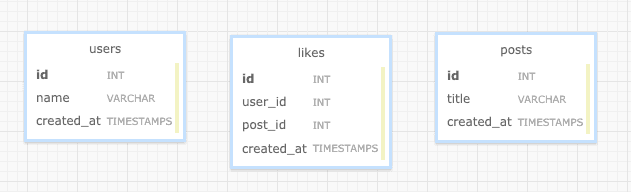
The likes table serves as a many-to-many intermediate table.
How to Save and Display Many-to-Many Relations in Laravel【belongsToMany】
Migration File
Create the likes table. Other table creations are omitted.
Generate the file using the command.
php artisan make:migration create_likes_tableEdit the migration file generated in databases/migrations/
Schema::create('likes', function (Bluepr$table) {
    $table->id();
    $table->bigInteger('post_id');
    $table->bigInteger('user_id');
    $table->timestamps();
});
Define Relations in User Model and Like Model
First, Create the Like Model.
Run the command.
php artisan make:model LikeDefine the relation in the User Model
The content written here is:
    // Define the many-to-many relation
    public function likes()
    {
        return $this->belongsToMany('App\Models\Post','likes','user_id','post_id')->withTimestamps();
    }

    // Check if the user has already liked this post
    public function isLike($postId)
    {
      return $this->likes()->where('post_id',$postId)->exists();
    }

    // Use isLike to check if the user has already liked the post, and then like it (avoid duplication)
    public function like($postId)
    {
      if($this->isLike($postId)){
        // Do nothing if already liked
      } else {
        $this->likes()->attach($postId);
      }
    }

    // Use isLike to check if the user has already liked the post, and then unlike it
    public function unlike($postId)
    {
      if($this->isLike($postId)){
        // Remove the like if already liked
        $this->likes()->detach($postId);
      } else {
      }
    }
Add Routing to web.php
Add the following two lines to web.php
Route::post('/like/{postId}',[LikeController::class,'store']);
Route::post('/unlike/{postId}',[LikeController::class,'destroy']);
Add Functions for Adding and Removing in the Controller
Create the LikeController using the command
php artisan make:controller LikeControllerEdit the LikeController
<?php

namespace App\Http\Controllers;

use Illuminate\Http\Request;

use Auth;

class LikeController extends Controller
{
    public function store($postId)
    {
        Auth::user()->like($postId);
        return 'ok!'; // Response content
    }

    public function destroy($postId)
    {
        Auth::user()->unlike($postId);
        return 'ok!'; // Response content
    }
}
Create the Like Button
I will skip displaying the post detail page file, routing, etc., and only write about creating the button to "like" a post.
Create the "Like" button in ***.blade.php
<button onclick="like({{$post->id}})">Like</button>For now, this should be fine.
When this button is pressed, it will trigger a function called like specified in the onclick.
Create the like function to be triggered by onclick
Create a js file and define a function like the following:
function like(postId) {
  $.ajax({
    headers: {
      "X-CSRF-TOKEN": $('meta[name="csrf-token"]').attr("content"),
    },
    url: `/like/${postId}`,
    type: "POST",
  })
    .done(function (data, status, xhr) {
      console.log(data)
    })
    .fail(function (xhr, status, error) {
      console.log()
    })
}
Try pressing it!
If data is added to the likes table in the database, it's OK!
Debugging in Case It Doesn't Work
【For Beginners】What to Do When a 419 Error Occurs in Laravel POST
Solution When app.js or app.css in Laravel Returns a 404 NOT FOUND
Check 1: Check the Console
The console, available in Google Chrome, can be accessed by right-clicking → Inspect → Console.
On a Mac, you can access it with the shortcut keys:
(Command + Option + I) → Console
Here you can see if there are 500 errors, 404 errors, etc.
If there is a 500 error, try debugging using the following article.
Check 2: Is JavaScript working?
Check if the function is working by adding the following to the function you created at the end (Check if texts are output in the console using Inspect → Console):
function like(postId) {
  console.log("Is it working?")
}
Finally, Create the Display for Unliking
<button onclick="unlike({{$post->id}})">Unlike</button>function unlike(postId) {
$.ajax({
headers: {
"X-CSRF-TOKEN": $('meta[name="csrf-token"]').attr("content"),
},
url: `/unlike/${postId}`,
type: "POST",
})
.done(function (data, status, xhr) {
console.log(data)
})
.fail(function (xhr, status, error) {
console.log()
})
}In the Case of Vue
The Laravel code remains the same.
Modify the vue file
<button @click="like(post.id)">Like</button>
<script>
  export default {
    data() {
      return {
        post: {}, // Assuming post information is stored in this variable
      }
    },
    methods: {
      like(postId) {
        axios.post(`/like/${postId}`).then(({ data }) => {
          console.log(data)
        })
      },
    },
  }
</script>
Liking a Post on the List Page
Implementing with jQuery
You can implement it with the JavaScript function written earlier.
@foreach($posts as $post)
<div>
  <div>{{ $post->title }}</div>
  <button onclick="like({{ $post->id }})">Like</button>
</div>
@endforeach
Implementing with Vue
<template>
  <div>
    <div v-for="post in posts">
      <div>{{ post.title }}</div>
      <button @click="like(post.id)">Like</button>
    </div>
  </div>
</template>
Conclusion
That's all. I have implemented the like functionality.
I hope this can be helpful to someone.
If you have any feedback, complaints, or articles you would like to add, please contact us through the contact form.
That's all!


