
Laravelのwith()の使い方|Eager LoadingでN+1問題を解消し、発行されるSQLの本数を比べる
目次
- 確かめに使ったテーブルとモデル
- with() なしだと、本15冊で SQL が16本になった
- with('author') で SQL が2本になった
- ネストしたリレーションは with('books.reviews')
- with() に条件を付ける
- カラムを指定するときは外部キーを忘れない
- 取得したあとに読み込む load()・loadMissing()
- 件数だけなら withCount()
- いつも読み込むなら $with プロパティ
- with() の書き忘れを見つける preventLazyLoading()
- with() を書かなくても読み込む automaticallyEagerLoadRelationships()
- まとめ
Laravelのwith()でリレーションを先に読み込む(Eager Loading)方法です。with()なしで16本だったSQLが2本になる様子、ネスト・条件・カラム指定の落とし穴、whereHasとの違い、load()・$with・preventLazyLoading・自動Eager Loadingを、Laravel 13で実際に発行されたSQLつきでまとめました。


Laravel の with() は、リレーション先のデータを先にまとめて読み込むためのメソッドです。
これを Eager Loading(イーガーローディング)と呼びます。
with() を書かずにループの中でリレーションを使うと、データの件数だけ SQL が発行されます。
いわゆる N+1 問題です。
この記事では、2026年11月に Docker の php:8.4-cli(PHP 8.4.28)・Composer 2.11.2・Laravel 13.43.0(SQLite)で、with() の有無や書き方を変えたときに発行された SQL を DB::listen() で数えた結果をまとめます。
画面の確認は Chromium 156 です。
確かめに使ったテーブルとモデル
著者(authors)・本(books)・レビュー(reviews)の3つのテーブルを作りました。
著者5人がそれぞれ本を3冊ずつ持ち、本1冊にレビューが2件ずつ付いています。
合計で著者5件・本15件・レビュー30件です。
// app/Models/Author.php
class Author extends Model
{
    public function books(): HasMany
    {
        return $this->hasMany(Book::class);
    }
}

// app/Models/Book.php
class Book extends Model
{
    public function author(): BelongsTo
    {
        return $this->belongsTo(Author::class);
    }

    public function reviews(): HasMany
    {
        return $this->hasMany(Review::class);
    }
}
hasMany・belongsTo の書き方そのものは、次の記事で書いています。
SQL の数え方は、次のように DB::listen() で発行された SQL を配列にためて、最後に本数と中身を出しました。
use Illuminate\Support\Facades\DB;

$log = [];
DB::listen(function ($query) use (&$log) {
    $log[] = $query->toRawSql();
});

// ここで調べたい処理を実行する

echo 'SQL ' . count($log) . "本\n";
with() なしだと、本15冊で SQL が16本になった
まずは with() を書かずに、本の一覧と著者名を出します。
SQL は何本出るでしょうか?
foreach (Book::all() as $book) {
    echo $book->title . ' / ' . $book->author->name . "\n";
}
結果はこうなりました。
SQL 16本
  select * from "books"
  select * from "authors" where "authors"."id" = 1 limit 1
  select * from "authors" where "authors"."id" = 1 limit 1
  select * from "authors" where "authors"."id" = 1 limit 1
  select * from "authors" where "authors"."id" = 2 limit 1
  select * from "authors" where "authors"."id" = 2 limit 1
  select * from "authors" where "authors"."id" = 2 limit 1
  ...(id = 3, 4, 5 も3回ずつ)
本を取る1本に加えて、本1冊ごとに著者を取る SQL が15本出ています。
これが「1 + N 本」で、N+1 問題と呼ばれる理由です。
同じ著者(id = 1)を3回取りに行っていて、一度取った著者を使い回してくれるわけではありませんでした。
Blade の一覧で同じことをすると、こうなります。
確かめるために、描画が終わったあとに DB::getQueryLog() の本数と SQL を画面の下に出しています。
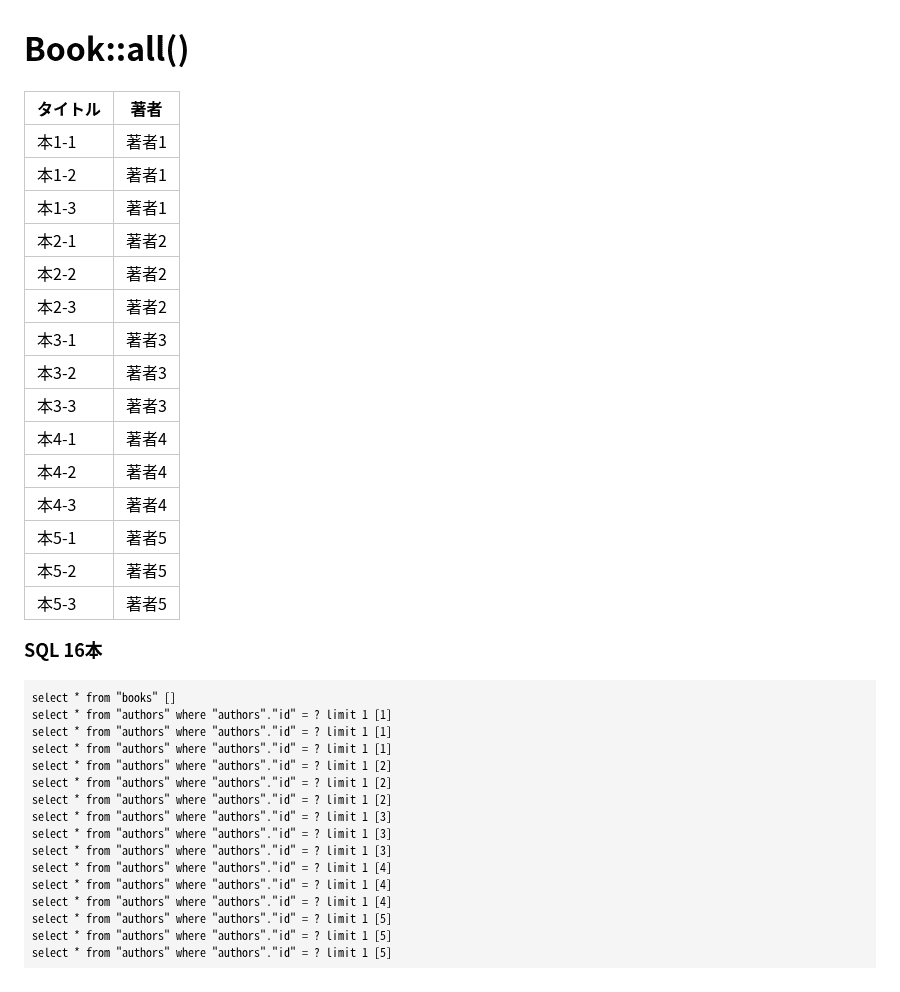
$book->author のように、リレーションをプロパティとして初めて使った時点で SQL が発行されます。
これを遅延読み込み(Lazy Loading)と呼びます。
with('author') で SQL が2本になった
Book::all() を Book::with('author')->get() に変えます。
foreach (Book::with('author')->get() as $book) {
    echo $book->title . ' / ' . $book->author->name . "\n";
}
SQL 2本
select * from "books"
select * from "authors" where "authors"."id" in (1, 2, 3, 4, 5)本を取ったあと、出てきた著者の id を in (1, 2, 3, 4, 5) でまとめて1本で取っています。
表示される内容はまったく同じでした。
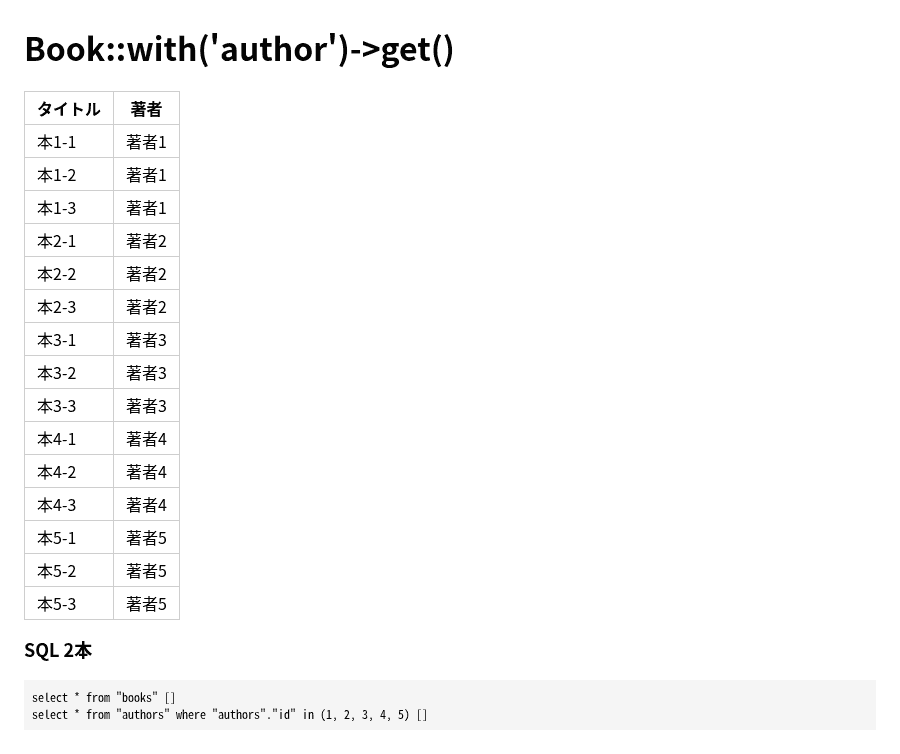
with() なしでは本の冊数だけ SQL が増えていきますが、with() ありなら増えるのは in (...) の中の id の数だけです。
逆向き(著者から本)の hasMany でも同じでした。
// with なし
foreach (Author::all() as $author) {
    $author->books->pluck('title');
}
SQL 6本
select * from "authors"
select * from "books" where "books"."author_id" = 1 and "books"."author_id" is not null
select * from "books" where "books"."author_id" = 2 and "books"."author_id" is not null
...(author_id = 5 まで)// with あり
foreach (Author::with('books')->get() as $author) {
$author->books->pluck('title');
}SQL 2本
select * from "authors"
select * from "books" where "books"."author_id" in (1, 2, 3, 4, 5)ネストしたリレーションは with('books.reviews')
著者 → 本 → レビューのように2段になると、with() なしの SQL はもっと増えます。
foreach (Author::all() as $author) {
foreach ($author->books as $book) {
$count += $book->reviews->count();
}
}レビュー 30件
SQL 21本
select * from "authors"
select * from "books" where "books"."author_id" = 1 and "books"."author_id" is not null
select * from "reviews" where "reviews"."book_id" = 1 and "reviews"."book_id" is not null
select * from "reviews" where "reviews"."book_id" = 2 and "reviews"."book_id" is not null
select * from "reviews" where "reviews"."book_id" = 3 and "reviews"."book_id" is not null
select * from "books" where "books"."author_id" = 2 and "books"."author_id" is not null
...著者1本 + 本5本 + レビュー15本で21本です。
ドットでつないで with('books.reviews') と書くと、3本になりました!
Author::with('books.reviews')->get();レビュー 30件
SQL 3本
select * from "authors"
select * from "books" where "books"."author_id" in (1, 2, 3, 4, 5)
select * from "reviews" where "reviews"."book_id" in (1, 2, 3, 4, 5, 6, 7, 8, 9, 10, 11, 12, 13, 14, 15)with('books.reviews') だけで books も読み込まれるので、with(['books', 'books.reviews']) と両方書いても SQL は同じ3本でした。
複数のリレーションを読み込むときは、with(['author', 'reviews']) のように配列で渡します。
with() に条件を付ける
読み込むリレーション側に条件や並び順を付けたいときは、キーにリレーション名、値にクロージャを書きます。
公開中(published = true)の本だけを、新しい順に読み込んでみます。
$authors = Author::with(['books' => function ($query) {
$query->where('published', true)->orderByDesc('id');
}])->get();著者1: 本1-2, 本1-1
著者2: 本2-2, 本2-1
SQL 2本
  select * from "authors"
select * from "books" where "books"."author_id" in (1, 2, 3, 4, 5) and "published" = 1 order by "id" desc条件は2本目の SQL にそのまま付きました。
各著者の3冊目(published = false)は読み込まれていません。
with() の条件では、親(著者)は絞り込まれない
ここで勘違いしやすいのが、with() の条件は「読み込むリレーションを絞る」だけで、親のモデルは減らないことです。
★5のレビューがある著者だけを出したいとして、with() と whereHas() で比べました。
$a1 = Author::with(['books.reviews' => fn ($q) => $q->where('stars', 5)])->get();
$a2 = Author::whereHas('books.reviews', fn ($q) => $q->where('stars', 5))->get();with に条件: 5人 / whereHas: 4人
select * from "authors"
select * from "books" where "books"."author_id" in (1, 2, 3, 4, 5)
select * from "reviews" where "reviews"."book_id" in (1, 2, ..., 15) and "stars" = 5
select * from "authors" where exists (select * from "books" where "authors"."id" = "books"."author_id" and exists (select * from "reviews" where "books"."id" = "reviews"."book_id" and "stars" = 5))with() では★5のレビューがない著者3も残り、$author->books の中のレビューが空になるだけでした。
親を絞りたいときは whereHas()、絞った上で同じ条件のリレーションも読み込みたいときは withWhereHas() を使います。
$authors = Author::withWhereHas('books.reviews', fn ($q) => $q->where('stars', 5))->get();withWhereHas: 4人
著者1: 本1-1(★5×1), 本1-2(★5×1), 本1-3(★5×0)
著者2: 本2-1(★5×1), 本2-2(★5×0), 本2-3(★5×0)
著者4: 本4-1(★5×0), 本4-2(★5×0), 本4-3(★5×1)
著者5: 本5-1(★5×0), 本5-2(★5×1), 本5-3(★5×1)
SQL 3本
select * from "authors" where exists (...)
select * from "books" where "books"."author_id" in (1, 2, 4, 5)
select * from "reviews" where "reviews"."book_id" in (1, 2, 3, 4, 5, 6, 10, 11, 12, 13, 14, 15) and "stars" = 5著者は4人に絞られました。
ただ、books.reviews のようにネストして書いた場合、条件が付いたのは最後の reviews だけで、★5のレビューがない本(本1-3 など)も books には入っていました。
本も★5のあるものだけにしたいなら、books 側にも条件が要ります。
カラムを指定するときは外部キーを忘れない
with('books:id,title') のように、コロンのあとに読み込むカラムを書けます。
ただ、外部キー(author_id)を入れ忘れると、エラーにならずに空になりました(;´Д`)
$author = Author::with('books:id,title')->first();
echo $author->books->count();著者1 の本: 0冊
select * from "authors" limit 1
select "id", "title" from "books" where "books"."author_id" in (1)SQL では本が3冊取れているはずなのに、0冊です。
取ってきた本に author_id がないので、どの著者の本なのかを Laravel が結び付けられないためです。
author_id を足すと3冊になりました。
$author = Author::with('books:id,author_id,title')->first();著者1 の本: 3冊 {"id":1,"author_id":1,"title":"本1-1"}
select "id", "author_id", "title" from "books" where "books"."author_id" in (1)belongsTo の向きで id を外した with('author:name') も、$book->author が NULL になりました。
NULL
select "name" from "authors" where "authors"."id" in (1)公式ドキュメントにも、カラムを指定するときは id と関係する外部キーを必ず含めるように、と書かれています(Eloquent: Relationships - Eager Loading Specific Columns)。
取得したあとに読み込む load()・loadMissing()
find() や all() で取ったあとに、リレーションを読み込みたいこともあります。
そのときは load() を使います。
$authors = Author::all();
$authors->load('books');
$authors->loadMissing('books');books 読み込み済み: true
SQL 2本
select * from "authors"
select * from "books" where "books"."author_id" in (1, 2, 3, 4, 5)load() で books を in (...) の1本で読み込み、続けて書いた loadMissing('books') は、もう読み込んであるので SQL を出しませんでした。
1件のモデルでも同じように使えます。
$author = Author::find(1);
$author->load('books'); select * from "authors" where "authors"."id" = 1 limit 1
select * from "books" where "books"."author_id" in (1)件数だけなら withCount()
一覧に「本の冊数」だけを出したいなら、本のデータを全部読み込む with() より withCount() のほうが軽いです。
foreach (Author::withCount('books')->get() as $author) {
echo $author->name . ' books_count=' . $author->books_count;
}著者1 books_count=3 loaded=false
著者2 books_count=3 loaded=false
SQL 1本
select "authors".*, (select count(*) from "books" where "authors"."id" = "books"."author_id") as "books_count" from "authors"SQL は1本で、books 自体は読み込まれていません。
withCount は次の記事で詳しく書いています。
いつも読み込むなら $with プロパティ
モデルに $with を書くと、毎回 with() を書かなくても読み込まれました。
class Book extends Model
{
protected $with = ['author'];
}# Book::all()
select * from "books"
select * from "authors" where "authors"."id" in (1, 2, 3, 4, 5)
# Book::find(1)
select * from "books" where "books"."id" = 1 limit 1
select * from "authors" where "authors"."id" in (1)find() でも著者まで取りに行くので、著者を使わない画面では余計な SQL になります。
その画面だけ外したいときは without()、別のリレーションに差し替えたいときは withOnly() です。
# Book::without('author')->get()
SQL 1本
select * from "books"
# Book::withOnly('reviews')->get()
SQL 2本
select * from "books"
select * from "reviews" where "reviews"."book_id" in (1, 2, ..., 15)with() の書き忘れを見つける preventLazyLoading()
Model::preventLazyLoading() を呼んでおくと、遅延読み込みが起きたときに例外を投げてくれます。
use Illuminate\Database\Eloquent\Model;
Model::preventLazyLoading();
foreach (Book::all() as $book) {
$book->author->name;
}Illuminate\Database\LazyLoadingViolationException
Attempted to lazy load [author] on model [App\Models\Book] but lazy loading is disabled.
SQL 1本
select * from "books"with('author') を付けると例外は出ず、SQL は2本でした。
ただし、Book::first() で1件だけ取って $book->author を使った場合は、例外にならずに著者を取りに行きました。
著者1
SQL 2本
select * from "books" limit 1
select * from "authors" where "authors"."id" = 1 limit 11件なら N+1 にならないので、見逃してくれるようです。
公式ドキュメントでは、AppServiceProvider の boot() に Model::preventLazyLoading(! $this->app->isProduction()); と書いて、本番以外の環境でだけ有効にする例が紹介されています(Preventing Lazy Loading)。
本番で例外にする代わりにログに残すだけにしたいときは、Model::handleLazyLoadingViolationUsing() で動きを変えられるとのことです。
with() を書かなくても読み込む automaticallyEagerLoadRelationships()
Laravel 13 には、使ったリレーションを自動でまとめて読み込む機能もありました。
Model::automaticallyEagerLoadRelationships() を呼んでから、さきほどの21本になったコード(著者 → 本 → レビュー)をそのまま動かしました。
Model::automaticallyEagerLoadRelationships();
foreach (Author::all() as $author) {
    foreach ($author->books as $book) {
        $count += $book->reviews->count();
    }
}
レビュー 30件
SQL 3本
select * from "authors"
select * from "books" where "books"."author_id" in (1, 2, 3, 4, 5)
select * from "reviews" where "reviews"."book_id" in (1, 2, 3, 4, 5, 6, 7, 8, 9, 10, 11, 12, 13, 14, 15)with() を1つも書いていないのに、with('books.reviews') と同じ3本になりました!
最初の著者の books を使った時点で、取得済みの著者全員分の books をまとめて読み込んでいるようです。
全体ではなく、1つのコレクションだけで有効にしたいときは withRelationshipAutoloading() を使います。
$books = Book::all()->withRelationshipAutoloading();

foreach ($books as $book) {
    $book->author->name;
    $book->reviews->count();
}
SQL 3本
select * from "books"
select * from "authors" where "authors"."id" in (1, 2, 3, 4, 5)
select * from "reviews" where "reviews"."book_id" in (1, 2, ..., 15)公式ドキュメントでは、全体で有効にするなら AppServiceProvider の boot() に書く例が載っています(Automatic Eager Loading)。
便利ですが、どこで何を読み込んでいるかがコードから見えにくくなるので、まずは with() を書いて、SQL の本数を確かめるクセを付けるのがいいと思います( ´∀` )
まとめ
Laravel 13 で確かめた結果をまとめます。
| 書き方 | 本15冊・著者5人での SQL |
|---|---|
Book::all() でループの中で $book->author | 16本 |
Book::with('author')->get() | 2本 |
| 著者 → 本 → レビューを with なし | 21本 |
Author::with('books.reviews')->get() | 3本 |
Author::withCount('books')->get() | 1本 |
automaticallyEagerLoadRelationships() を有効にして with なし | 3本 |
ループの中でリレーションを使うなら with() を付ける、カラムを指定するなら外部キーを入れる、親を絞るのは whereHas()、の3つを覚えておけば、だいたい困らないはずです。
関連する記事です。


